
TagFlux plugin
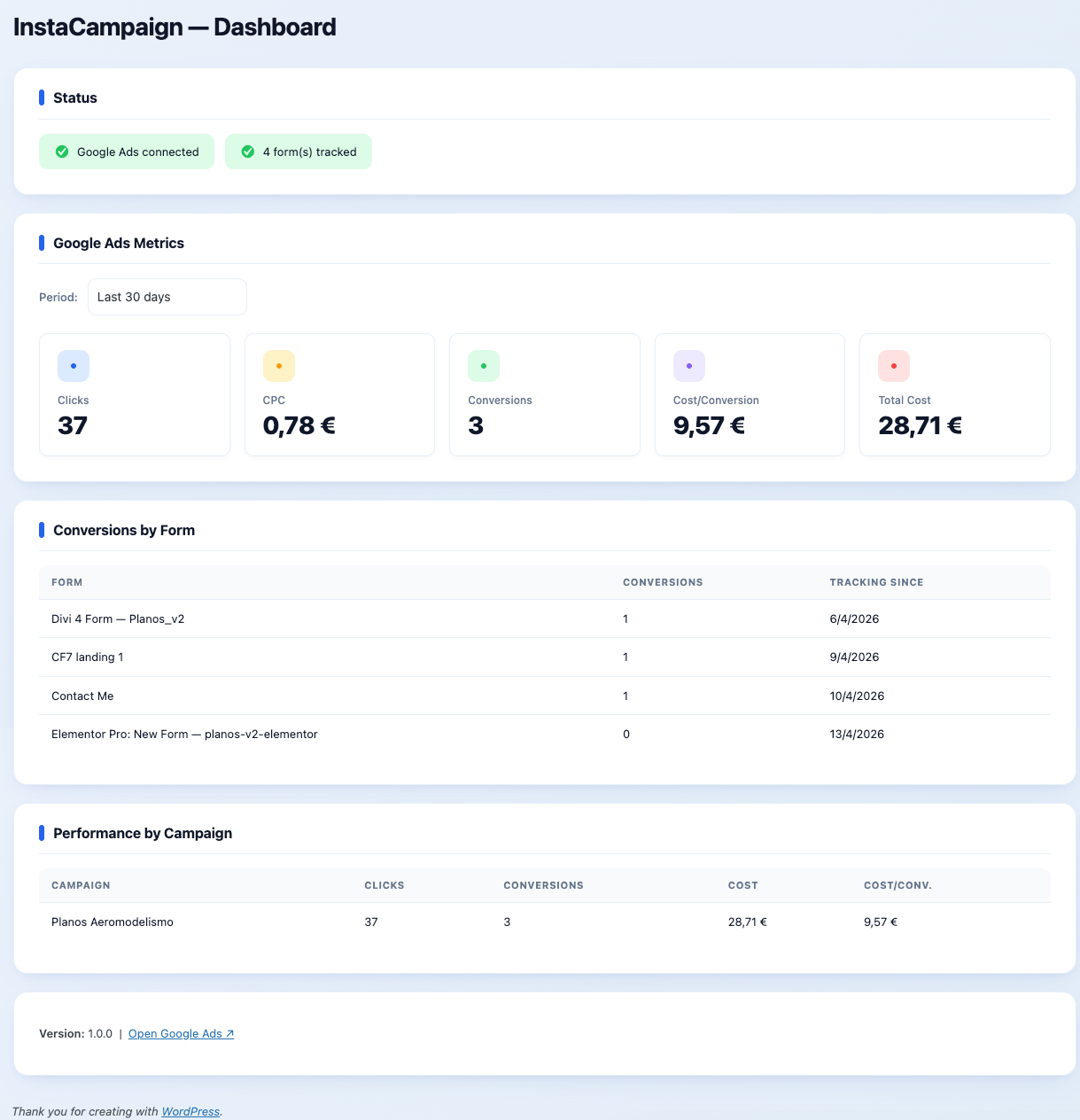
From WP admin you get a dashboard with the key KPIs (Clicks, CPC, Conversions, Cost/Conversion, Total Cost) broken down by form, campaign, and landing page. Google Ads connects via OAuth without leaving WordPress.
Getting Started

Install & activate the plugin from the WordPress repository.

Connect Google Ads with one click (OAuth handled for you) and pick which forms to track.

Open the dashboard — your stats are already there. ( convertions will appear from install date)
Under 2 minutes. No code. No setup wizard.
Server-side Google Ads conversion tracking
TagFlux uses server-side conversion tracking to send your WordPress form submissions to Google Ads through the TagFlux backend.
When a visitor arrives from a Google Ads click, TagFlux stores the Google Click Identifier (gclid) in a first-party cookie. If that visitor submits a tracked form, the conversion is reported to Google Ads through the backend instead of relying only on browser-side tags.
The result is more reliable Google Ads conversion tracking for lead generation websites, without maintaining a custom Google Tag Manager or gtag setup.
Why TagFlux instead of Google Tag Manager?
Setting up Google Ads conversion tracking by hand usually means editing gtag snippets, configuring triggers in Google Tag Manager, and testing events one by one.
TagFlux skips the manual tag setup: it detects your WordPress forms, captures the gclid, and reports form submissions to Google Ads server-side through the TagFlux backend using the Google Ads API.
That means no GTM container to maintain, no custom JavaScript, no manual event setup, and fewer moving parts between your forms and your Google Ads conversion actions.
Supported form plugins

Contact Form 7
WPForms
Elementor Pro Forms
Ninja Forms
Divi Forms
If your Google Ads traffic lands on a WordPress page using one of these form plugins, TagFlux can track those form submissions as Google Ads conversions.
Frequently asked questions
Does TagFlux support server-side tracking?
Yes. TagFlux sends tracked WordPress form submissions to Google Ads through the TagFlux backend using the Google Ads API. It captures the Google Click Identifier (gclid) from Google Ads traffic and uses it to report the conversion server-side.
Is this the same as Google Tag Manager server-side tracking?
No. TagFlux does not require you to set up a server-side Google Tag Manager container. It provides a simpler server-side tracking flow for WordPress form submissions and Google Ads conversions.
Do I still need Google Tag Manager?
No. TagFlux is designed to track Google Ads form conversions without Google Tag Manager, gtag snippets or custom JavaScript. It auto-detects supported WordPress forms and sends conversions to Google Ads through the backend.
Which WordPress form plugins does TagFlux support?
TagFlux currently supports Contact Form 7, WPForms, Elementor Pro Forms, Ninja Forms and Divi Forms.
What does TagFlux track?
TagFlux tracks WordPress form submissions that come from Google Ads traffic. It captures the gclid from the ad click, stores it in a first-party cookie, and sends the conversion to Google Ads through the TagFlux backend when a tracked form is submitted.
Request a Feature or Report a Problem
Have an idea we should build, or spotted something broken? Tell us — we read every message